Tag: seo

  • SEO, PPC, SMM, and Other Abbreviations You Should Know

    SEO, PPC, SMM, and Other Abbreviations You Should Know

    If you work as a marketer or are well-versed in online marketing, there are several digital marketing terms, presented as abbreviations, that you’ve had to become familiar with. If you’re fairly new to the game, knowing what several key terms and abbreviations are will make your life much easier.

    There are so many terms to learn and understand. To make things more complicated, several of them are so similar that one letter makes a huge difference. Below is a list of commonly used, but very important, abbreviations for digital marketing.

    SEO – Search Engine Optimization

    SEO defines a set of techniques and strategies used to organically ( or for free) improve a given website’s rank and visibility on the search engines, build an online audience, and drive targeted traffic to the site. SEO is used to rank a website as high as possible on a search engine’s results page (SERP) for a given search term or keyword. The higher your website ranks, the more traffic it receives along with other desirable benefits.

    Related: ElevenTreeMedia.com | How to Design a Website That Will Rank Well in Organic Search

    CTA – Call to Action

    Calls to action are very popular in online marketing now and refer to the graphics, banners, images, and more on live website pages or advertisements that encourage the visitor to take some action. Requested actions can range from reading a landing page, signing up for a newsletter, downloading content, or completing a form. They are useful requests and when used correctly, can do much to increase customer engagement.

    SEM – Search Engine Marketing

    SEM refers to online marketing that involves the use of search engines in its techniques or strategies with the goal of increasing the visibility of websites. SEO is part of SEM technically. That being said, since organic SEO strategy has greatly grown in importance and use, they are separate terms now. SEO has earned its own category. SEM, with SEO removed, refers mostly to paid search engine advertising.

    Related: SearchEngineLand.com | What Is Search Marketing?

    CTR – Click Through Rate

    A click through rate is a rate at which users are responding to your CTAs and “clicking through” to the following step in your online marketing strategy. It’s an easy rate to calculate as all you have to do is divide the number of clicks that a page or CTA has gotten by the total number of impressions (views) the page or CTA ultimately receives.

    PPC – Pay Per Click

    PPC is a popular type of paid advertising where the advertiser pays a specified amount each time a visitor clicks on one of their ads. PPC is a way to boost existing SEO strategies as you’re paying for top positions that you haven’t been able to earn yet. Using pay-per-click to drive revenue and targeted traffic to your website is an effective online marketing strategy.

    Related: BearFoxMarketing.com | How Google Ads (PPC) Can Build Your Business.

    SMM – Social Media Marketing

    Social Media Marketing

    The use of social media venues like Facebook, Instagram, LinkedIn, Snapchat, and Twitter as a marketing strategy is called SMM. SMM has distinct advantages because the reach of most social media venues is substantial. If the business can push out compelling, creative content, it could be shared by the public or perhaps even go viral. SMM is invaluable in increasing brand awareness and engaging with the customers you’re trying to reach.

    CMS – Content Management System

    A CMS is a system that allows a business to offer a high-performing, versatile website complete with the ability to manipulate and edit it without knowing HTML or any other programming languages. There are several types of CMS, but for our purposes, we mean systems for web publishing like WordPress, Drupal, Joomla, Magento, and more.

    Related: TechTarge.com | Content Management System (CMS)

    CPC – Cost Per Click

    CPC is in reference to an ad type where an advertiser agrees to pay a set amount each time a visitor clicks on one of their ads using PPC. The amount is subjective based on the keywords requested and their current popularity along with other considerations. CPC can be used to discern the cost-effectiveness of your online marketing campaign. To calculate it, divide the total cost of the campaign by the total number of received clicks.

    CPM – Cost Per Thousand

    A variation on PPC, CPM offers the advertiser a way to pay in advance for ad impressions or views. Advertisers are paying for their ad to be displayed versus requiring customer engagement through a click. Since that is the case, the best use of CPM is to increase brand awareness. It wouldn’t be the best choice for someone looking for a higher CTR.

    Related: AtInternet.com | Glossary: CPM

    KPI – Key Performance Indicator

    A metric to show a company’s progress in achieving their online goals, KPIs are important to identify. They can be different from one business to another based on a lot of factors. KPIs are very important in measuring the results of a company’s online marketing efforts over time.

    UX – User Experience

    A relatively new abbreviation, UX simply means user experience with a product or service. When it comes to online marketing efforts, good user experiences on your business website helps establish trust and makes it more likely that the customer will return or take action.

    Related: GeneralAssemb.ly | The Trick to Great UX: Understanding Your True Customer Journey

    ROI – Return on Investment

    ROI is the abbreviation for something that’s always been important in online marketing. It’s important to know whether the time and monetary investment in a marketing campaign produced a loss or a profit. ROI is measured by reviewing the number of serious leads or conversions produced per how much money (and time) was invested.

    Digital marketing is a vast topic and can be confusing in the beginning. Once you’ve learned the jargon, it’s not difficult to learn what each means, how it works, and finally, how it can be of great benefit to you and your business.


  • Four Different Kinds of Blog Articles and When to Unleash Them

    Four Different Kinds of Blog Articles and When to Unleash Them

    Purpose of Blog Articles

    The burgeoning of the internet brought with it the blog. “Blog” is simply an abbreviation for “weblog.” Businesses post blogs on their websites not only to provide more education about their product or service, but also to drive traffic to their sites via keywords. Therefore, creating an article for a business blog is similar to writing an essay.

    Below are four types of essays or articles to choose from with examples for a wedding-themed blog for perspective.

    Narrative Articles

    This type of article is simply based on a narration of something that has been experienced. For example, a narrative piece for a wedding blog might be the story of that wonderful honeymoon vacation that a couple took to Aruba. The article would share their personal experience and therefore qualifies as a narrative.

    Expository Articles

    Don’t let the word expository scare you. Just analyze the word for its meaning. To expose something simply tells your readers all about it. Therefore, an expository article for a wedding blog would likely be something like a detailed description of a wedding-related subject. For example, a great topic for an expository article might be a re-telling and description of the recent wedding of Prince Harry and Meghan Markle.

    Persuasive Articles

    Most businesses that have articles obviously have items or services for sale. Hence, a persuasive piece for the wedding blog could easily be an article that promotes purchasing or renting wedding attire from a specific vendor or business. In this case, the material will naturally seek to convince the reader to patronize their company. Nevertheless, persuasive articles aren’t always all about selling something; sometimes they can be political or even religious in nature. It all depends on the clientele.

    Analytical Articles

    To analyze something simply means to make an analysis of a topic. The analysis can be of almost anything—from chemical to mathematical to grammatical to academic—the types of measurement are practically endless. Therefore, an article for our wedding blog could simply be a statistical one that shows the costs of the average American wedding for our current time frame.

    Blog Happily Ever After

    Now that you feel more comfortable with these varieties of blog articles, you’ll hopefully have a better idea of the various articles you can put up on your blog. You can choose to stick to only one kind of article type, or you can mix things up a bit with each post. It essentially depends on your business and your taste. Either way, feel free to contact us if you have further questions concerning content management for your website. We’d be happy to help you determine which articles are best for you and your business!

  • Congrats, You Have a Company Blog…Now What?

    Congrats, You Have a Company Blog…Now What?

    Congratulations! As part of growing your business and expanding your digital marketing strategy, you added a blog to the company site. Now all you need to do is decide what to write… Feeling the writer’s block yet? If you’re not sure how to connect with your audience on this new platform, here are some ideas to get you started.

    Highlight the Highlights

    Capitalize on business success by recapping it in your blog. If possible, connect a company highlight to a current event, either national or local. For example, if your business was named a top performer in its sector, and that sector is doing well on Wall Street, that could serve as a casual link to grab reader attention. Promotions, retirements, and other noteworthy events that are not confidential can be publicized on the blog to tout company personnel while piquing public interest.

    Spoilers

    If your company is planning an expansion, developing a new product, or moving to a new location, these are events worth mentioning on your blog. News that is not controversial or negative can help to build public relations for the business and keep the company name in the public eye, or at least those who find your company on the web. If your company plans to participate in an expo or send a speaker to a conference, that is worth mentioning, too.

    You might also wish compare your company’s progress to that of local competitors — not in a mean-spirited way, but as a means of placing your company in context within the industry.

    Brag a Little

    Posting about how your company is involved in the community is a great way to connect with readers on a personal level. Whether it’s making a donation to the Little League team or offering space for the Girl Scouts to sell cookies, positive interactions and connections with the public make favorable impressions on readers. They appreciate reading blog posts about how the company gives back to the community that supports it, either through monetary donations or volunteer hours.

    Many charitable organizations are happy to partner with businesses in exchange for a steady stream of volunteers. For example, the Humane Society of Greater Miami has a specific corporate volunteer program for this purpose.

    Blog What You Know

    Finally (and most importantly), keep it relevant. It may seem tempting to write a piece on whatever’s trending, but any traffic you attract is unlikely to linger on your site or help generate leads. Unless you can find a way to make that trendy thing tie in to your industry, stick to what you and your company do best. For example, this SEO company wrote an article explaining what they do to introduce readers to their services.

    But First…They Need to be Able to Find You!

    Speaking of SEO — there’s no point to having a blog if no one is reading it. Using search engine optimization (SEO) techniques like keyword research, meta titles, meta descriptions, and image alt text are basic ways to help people find your blog next time they do a Google search. Once they’ve landed on your domain, they may end up browsing the site itself and become interested in your products or services.

    Need a little help getting your blog off the ground — or maybe updating your company site? Let Eleven Tree Media be your guide. Check out our FAQs here!

  • Sizing and Compressing Images for WordPress

    Sizing and Compressing Images for WordPress

    We have been getting a lot of questions lately regarding image sizes for website design and WordPress posts so I decided to create a quick rundown regarding sizing and compressing images for WordPress. Oftentimes people simply upload an image into their WordPress media library without a second thought, not realizing that image size plays a huge part in website speed, SEO and overall optimization.

    What Does Sizing and Compression Do For Me?

    Sizing and compressing your images for WordPress has several benefits, but the two we want to focus on are site speed / load time and SEO… both of which are very important when it comes to the overall standing of your website. Google continues to penalize sites for slow load times and image issues. Sizing your images properly and then using some sort of compression plugin or online compression tool keeps your site speed up and makes sure your SEO optimization is on point.

    High resolution images that are too big can really lower your page speed to the point where Google will start to hit you hard. Not to mention that the slower the site speed the less likely your visitors are to stay on your site. Wasting page speed and site resources is a great way to really push people away from your site.

    Sizing and Compression Plugins and Online Tools

    Basically you have a couple different ways to go here. You can either decide to get a WordPress image optimization plugin, or you can find and use one of several high quality online tools. I have done both, and while both have their advantages I have settled into using an online image compression tool that is fast, easy and free. Now, you may choose to go the plugin route for one reason or another. Depending on your situation and what all you are trying to accomplish with your images will determine what type of image compression plugin you use.

    If you are interested in some of the best WordPress image optimization plugins available, then check out Raelene Morey’s “10 Best Image Optimization Plugins to Speed Up Your WordPress Site.” She has already laid out and given a ton of information on what she thinks are the best WordPress image optimization plugins.

    When I work with clients and whenever I am teaching them how to configure images I usually always use an online tool called Tiny PNG. While there are other online tools available for this type of compression I have found Tiny PNG to be the best for what we are usually doing for clients. Not only is it very easy to use, but the tool always works and of course…. it is free, which obviously attracts a lot of people.

    How To Size and Compress Images for WordPress

    Let’s just go through the routine we use here more often than not at Eleven Tree Media. Unless you are using a huge image for some front page across site image, or huge header image for something, then you really don’t ever need to upload images that are any bigger than 1000px X 1000px… and that is pushing it. This goes for images used in everything… posts, pages, WooCommerce… etc.

    Step 1: Image Sizing

    Apple: Open your image up and size it down using your tool of choice. On a Mac you simply open the image in “Preview” and in toolbar area you will see a “Tools” option. Click on tools > adjust size and adjust the size accordingly. Again, anything over 1000px across is overdoing it and more often than not your image needs will be smaller. Once you adjust the size your image will be ready for compression.

    Adjusting-Image-Size

    PC: If you are using a PC there are a few different options, but the easiest way to size an image quickly is to follow the steps in the video below.

    Step 2: Image Compression

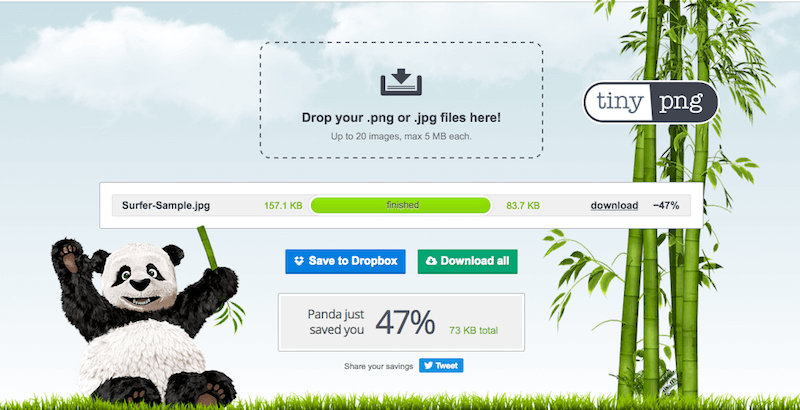
    At this point your image is now sized down and is ready for compression. Take the image or images you recently sized and head over to Tiny PNG You will immediately see where to drag and drop images. You simply drag your images into the drop area and Tiny PNG will do the rest. You will see the compression numbers and be able to see the amount of space that the compression engine is saving you.

    There is also detailed documentation about image quality and how your images remain high quality even after the compression, so feel free to view that. If you are skeptical go ahead and download the newly compressed file, open it, and compare it to the image that hasn’t been compressed. You will not see a difference. I have run a sample for you and posted the results in the screenshot below.

    Tiny-PNG-Sample

    Final Thoughts

    These days it isn’t enough to just add images to your website. Whatever type of website you are running it is very important to address the issue of sizing and compressing images for WordPress. Whether you are running an online eCommerce site, a business site with a blog, or a full online blog, making sure your images are nice and tight will insure that you are not sacrificing site speed, SEO or site resources.