
Tag: wordpress

  • Congrats, You Have a Company Blog…Now What?

    Congrats, You Have a Company Blog…Now What?

    Congratulations! As part of growing your business and expanding your digital marketing strategy, you added a blog to the company site. Now all you need to do is decide what to write… Feeling the writer’s block yet? If you’re not sure how to connect with your audience on this new platform, here are some ideas to get you started.

    Highlight the Highlights

    Capitalize on business success by recapping it in your blog. If possible, connect a company highlight to a current event, either national or local. For example, if your business was named a top performer in its sector, and that sector is doing well on Wall Street, that could serve as a casual link to grab reader attention. Promotions, retirements, and other noteworthy events that are not confidential can be publicized on the blog to tout company personnel while piquing public interest.

    Spoilers

    If your company is planning an expansion, developing a new product, or moving to a new location, these are events worth mentioning on your blog. News that is not controversial or negative can help to build public relations for the business and keep the company name in the public eye, or at least those who find your company on the web. If your company plans to participate in an expo or send a speaker to a conference, that is worth mentioning, too.

    You might also wish compare your company’s progress to that of local competitors — not in a mean-spirited way, but as a means of placing your company in context within the industry.

    Brag a Little

    Posting about how your company is involved in the community is a great way to connect with readers on a personal level. Whether it’s making a donation to the Little League team or offering space for the Girl Scouts to sell cookies, positive interactions and connections with the public make favorable impressions on readers. They appreciate reading blog posts about how the company gives back to the community that supports it, either through monetary donations or volunteer hours.

    Many charitable organizations are happy to partner with businesses in exchange for a steady stream of volunteers. For example, the Humane Society of Greater Miami has a specific corporate volunteer program for this purpose.

    Blog What You Know

    Finally (and most importantly), keep it relevant. It may seem tempting to write a piece on whatever’s trending, but any traffic you attract is unlikely to linger on your site or help generate leads. Unless you can find a way to make that trendy thing tie in to your industry, stick to what you and your company do best. For example, this SEO company wrote an article explaining what they do to introduce readers to their services.

    But First…They Need to be Able to Find You!

    Speaking of SEO — there’s no point to having a blog if no one is reading it. Using search engine optimization (SEO) techniques like keyword research, meta titles, meta descriptions, and image alt text are basic ways to help people find your blog next time they do a Google search. Once they’ve landed on your domain, they may end up browsing the site itself and become interested in your products or services.
    Need a little help getting your blog off the ground — or maybe updating your company site? Let Eleven Tree Media be your guide. Check out our FAQs here!

  • Sizing and Compressing Images for WordPress

    Sizing and Compressing Images for WordPress

    We have been getting a lot of questions lately regarding image sizes for website design and WordPress posts so I decided to create a quick rundown regarding sizing and compressing images for WordPress. Oftentimes people simply upload an image into their WordPress media library without a second thought, not realizing that image size plays a huge part in website speed, SEO and overall optimization.

    What Does Sizing and Compression Do For Me?

    Sizing and compressing your images for WordPress has several benefits, but the two we want to focus on are site speed / load time and SEO… both of which are very important when it comes to the overall standing of your website. Google continues to penalize sites for slow load times and image issues. Sizing your images properly and then using some sort of compression plugin or online compression tool keeps your site speed up and makes sure your SEO optimization is on point.

    High resolution images that are too big can really lower your page speed to the point where Google will start to hit you hard. Not to mention that the slower the site speed the less likely your visitors are to stay on your site. Wasting page speed and site resources is a great way to really push people away from your site.

    Sizing and Compression Plugins and Online Tools

    Basically you have a couple different ways to go here. You can either decide to get a WordPress image optimization plugin, or you can find and use one of several high quality online tools. I have done both, and while both have their advantages I have settled into using an online image compression tool that is fast, easy and free. Now, you may choose to go the plugin route for one reason or another. Depending on your situation and what all you are trying to accomplish with your images will determine what type of image compression plugin you use.

    If you are interested in some of the best WordPress image optimization plugins available, then check out Raelene Morey’s “10 Best Image Optimization Plugins to Speed Up Your WordPress Site.” She has already laid out and given a ton of information on what she thinks are the best WordPress image optimization plugins.

    When I work with clients and whenever I am teaching them how to configure images I usually always use an online tool called Tiny PNG. While there are other online tools available for this type of compression I have found Tiny PNG to be the best for what we are usually doing for clients. Not only is it very easy to use, but the tool always works and of course…. it is free, which obviously attracts a lot of people.

    How To Size and Compress Images for WordPress

    Let’s just go through the routine we use here more often than not at Eleven Tree Media. Unless you are using a huge image for some front page across site image, or huge header image for something, then you really don’t ever need to upload images that are any bigger than 1000px X 1000px… and that is pushing it. This goes for images used in everything… posts, pages, WooCommerce… etc.

    Step 1: Image Sizing

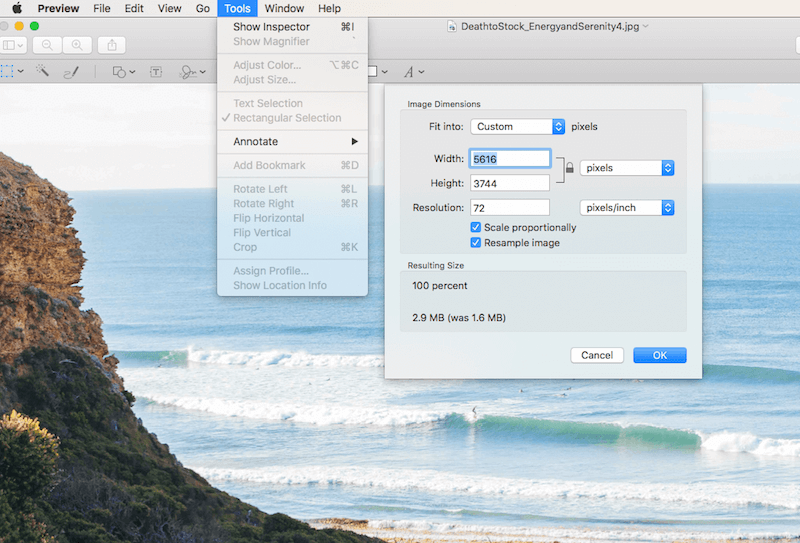
    Apple: Open your image up and size it down using your tool of choice. On a Mac you simply open the image in “Preview” and in toolbar area you will see a “Tools” option. Click on tools > adjust size and adjust the size accordingly. Again, anything over 1000px across is overdoing it and more often than not your image needs will be smaller. Once you adjust the size your image will be ready for compression.

    Adjusting-Image-Size

    PC: If you are using a PC there are a few different options, but the easiest way to size an image quickly is to follow the steps in the video below.

    Step 2: Image Compression

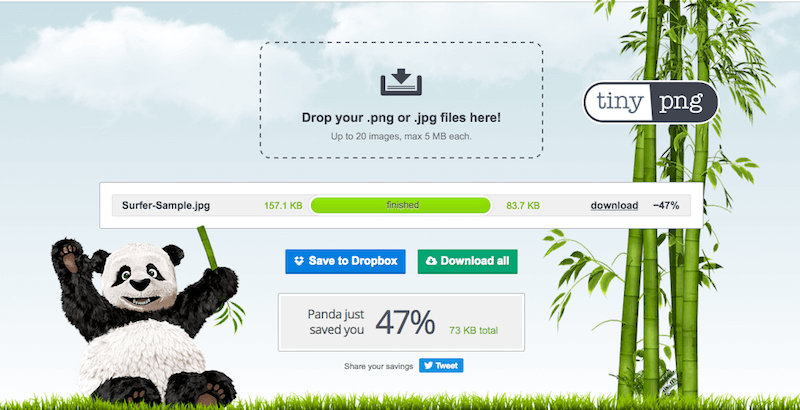
    At this point your image is now sized down and is ready for compression. Take the image or images you recently sized and head over to Tiny PNG You will immediately see where to drag and drop images. You simply drag your images into the drop area and Tiny PNG will do the rest. You will see the compression numbers and be able to see the amount of space that the compression engine is saving you.

    There is also detailed documentation about image quality and how your images remain high quality even after the compression, so feel free to view that. If you are skeptical go ahead and download the newly compressed file, open it, and compare it to the image that hasn’t been compressed. You will not see a difference. I have run a sample for you and posted the results in the screenshot below.

    Tiny-PNG-Sample

    Final Thoughts

    These days it isn’t enough to just add images to your website. Whatever type of website you are running it is very important to address the issue of sizing and compressing images for WordPress. Whether you are running an online eCommerce site, a business site with a blog, or a full online blog, making sure your images are nice and tight will insure that you are not sacrificing site speed, SEO or site resources.