Category: Website Design

  • The Benefits of Having a Mobile-Friendly Website for Your Business

    The Benefits of Having a Mobile-Friendly Website for Your Business

    People are ditching laptops and using their cell phones to shop, pay bills, and do research. There’s no need to find a PC to do what you need on the world wide web. The beauty of using a smartphone is that you can access the internet anytime and anywhere. Businesses realize the importance of ensuring their webpage is mobile optimized.

    If your customers cannot easily read and shop from their phones, then you could be missing out on much-needed revenue. If you’re on the fence about spending the money on mobile optimization, here are some things to consider.

    Good for SMS Marketing

    Things have changed over the past decade. According to Podium, a majority of online traffic comes from mobile devices, so by using SMS marketing, you can reach potential customers on a platform where people are looking for messages, which can help you get ahead of the competition. Utilizing SMS text messages can help take your business to a whole new level.

    If you’re having a sale or want to update a customer on their order status, you can simply send a text. Millennials would rather get a text than an email or robocall. You must reach them where they live, and today’s generation is always on their cell phones. So as a company, you must adapt your marketing and sales tactics to trends in society.

    Higher Search Engine Ranks

    One of the main goals of any marketing department is to improve SEO. Did you know that having a mobile-friendly website will allow you to have higher search engine rankings? Just think of all the ways that an increased position can affect your business.

    Most consumers look at the first page of web results when they do a search. If your company is not in the top 10, then you are not going to get the desired level of traffic. However, if you are showing up in the top spots, you will have increased interest, which will turn into enhanced revenue.

    Easier to Manage

    Since more than half of the population is shopping from a cell phone, you need to ensure that your page is optimized to meet that need. Many companies feel that it’s mysterious and difficult to optimize their websites. However, it’s not at all challenging, and it’s a whole lot easier to manage than a dedicated app.

    Your IT department must adjust your current website’s content so that it is user-friendly across a mobile platform. Once optimized, the goal is to have content that flows effortlessly between both desktop and mobile devices. The result is the customer gets an outstanding experience.

    Consumers Expect It

    One of the most significant reasons that you need to have your website mobile-optimized is to meet your customers’ expectations. If you’re trying to shop and a website won’t load properly on your phone, then you will go to a site with elevated service. Without optimization, your site will be challenging to navigate on anything other than a computer or tablet. Do you want to miss out on all those potential customer interactions and sales?

    Improve the User Experience

    There are so many things that you can do on your site that will enhance the user experience. For starters, you can put a button where they can click to call your office. By simply touching the area on their screen, their cell phone will dial your number. You can also put a virtual assistant that can chat with them and all sorts of other features. You want to make sure that potential customers can utilize the full offerings of your site without putting down their phones.

    Customers Stay on Your Site Longer

    According to Crazy Egg, the average consumer spends just over two minutes on a website. The longer they are on your site, the more interested they are in your products or services. Now, if you have all sorts of features to keep them engaged, they will spend more time exploring your offerings.

    The goal is to increase the time a potential customer spends looking around. If you increase your rankings, then you are going to get traffic that is eager to learn about your company. So, you want them to spend as much time as possible engaging with your site, and mobile optimization is the tool that can make it happen.

    Don’t become overwhelmed by the thought of making some changes to your website for the use of mobile phones. The money you spend to utilize mobile optimization is worth every penny. Not only will you have improved SEO, but you will have customers that come to your site ready to learn and shop with your company. It’s a valuable way to enhance the customer experience, and, over time, it will improve your bottom line.

    Looking for a beautiful website for your company? Let Eleven Tree Media design it for you!

  • 5 Unforgivable Sins of Web Design

    5 Unforgivable Sins of Web Design

    Web design encompasses the creation and maintenance of a website, inclusive of the layout, user interface, text, and graphics. With about half of the world’s population being able to access the internet, websites have become indispensable tools for increasing visibility and getting information out to potential customers.

    Compared to other forms of advertisement, like print and broadcast media, websites not only offer a more affordable way to sell your brand, but they also allow for more personal business-to-client interactions. It is essential to have a well-thought-out plan for your website to avoid the pitfalls from the start. Here are the five biggest sins of web design and how to prevent them.

    Not Linking Social Media

    Not using social-media platforms is a sure way to bury your business. An excellent way to integrate this is by linking your webpage to your social media accounts. Do not stop at having the icons as a header/footer.

    You can drive traffic to the social media account by including a subtle call to action on your webpage, and again, this should be as effortless as possible. Enable clients to sign onto our website or leave reviews by logging in via their social media accounts.

    Consider making information on your website shareable via social media. If one client can share your information regularly, you can increase the traffic to your site.

    More: Wordstream

    Relying on a Free Website Builder

    Free website builders might seem attractive when you think about the coins your business can save on paid website builders, but it may cost you in the long run. For starters, most free website builders do not fully integrate SEO optimization. A lot of that work has to be done yourself, or done by someone you hire–it’s not included.

    Secondly, you do not get to have a unique domain name, which makes it harder for clients to find you. They also tend to use one server for too many sites, thus making your page slow to load. Nothing drives clients off your page faster than slow loading because it costs them both time and money.

    More: Template Monster

    Hiding Core Information

    Another major mistake is to make it difficult for a user to find vital information on your website. This is guaranteed to work against you. Online users want to see the information they are looking for as quickly as possible.

    With so much information out there, if one look at a website does not promptly yield the information being sought, then the user moves on to the next site. A great page has the most vital information prominently displayed or easy to find. Having a search bar to specify what a client is looking for is one way to make information quickly available.

    More: Info Entrepreneurs

    Ignoring Reviews

    Most people say online reviews help them to make decisions on purchases. Businesses cannot afford to ignore online reviews. They can potentially affect the reputation of your company and your local search rankings as well as consumer decisions.

    Good reviews will give good rankings on search engines and a positive image of your products and services. Negative reviews should never be ignored or overlooked. Tactfully responding to or finding a way to resolve them is your best shot at maintaining a positive image.

    More: Podium

    Keyword Stuffing

    While the inclusion of keywords might rank you higher on search engines, the same search engines will actually penalize your site for overdoing it. Reading the same words over and over again also gives a negative experience to visitors on your site. As a rule, ensure that keywords do not make up more than two percent of the total words on a page.

    Avoiding these pitfalls will give you a robust site that will help manage and sell your brand and take your business where you want it to go.

  • How To Design a Website That Will Rank Well in Organic Search

    How To Design a Website That Will Rank Well in Organic Search

    Organic search performance and web design are intrinsically linked. In other words, web design has a direct impact on a website’s ability to rank higher for specific search terms. This is one area that most businesses fail to take advantage of. Often, the marketing and design teams work in isolation. In some cases, the marketing team is brought on board when the website is already running.

    When SEO is overlooked during the design stage, it can cause ranking challenges down the line.  From an SEO point of view, a well-designed site should take into consideration the following strategies.

    Design With Users in Mind

    The goal of any search engine is to make it easier for users to find what they are looking for. This means that search engines reward websites that offer the best user experience. They are avoiding a situation where a user visits a site only to find it frustrating to use.

    Good design is not be limited to desktop usability. Mobile friendliness is equally essential in improving the user experience. Website responsiveness is an absolute must for your site to rank well in organic search.

    Good user experience translates to longer time spent on the site, a significant amount of social shares, and a high number of quality inbound links. These factors are what search engines see as an indication of good usability. Consequently, they reward you with a better rank.

    Basically, a well-designed website will engage visitors once on the site. A/B testing is, therefore, crucial various to assess user experience. Presentation of content is also essential. There is always a temptation to add more content, but doing this just adds clutter to the design. Of more importance is the relevance of your content to the intended audience.

    Optimize Indexable Content

    Despite the advancement in crawling technology, search engines are still limited in the way they interpret content. The way you look at your website may not be the same as how search engines see it. To rank well on organic search, you should ensure the most important content is in HTML text format. Non-text content such as Flash files, images, and applets are ignored by the crawlers. This doesn’t mean that you can’t design a video or image-rich site that rank well in search engines.

    There are various strategies you can use to solve this problem:

    • Provide alt text for images and videos. These are the HTML text that gives search engines a description of multimedia content.
    • Supplement Java applets and Flash with text.
    • Provide a transcription for audio and video content if the information is meant to be used in ranking.
    • Provide navigation and crawlable links to supplement search boxes on the site. Please note that search engines do not use search boxes on the site to find content.

    Improve on the Crawlable Link Structure

    Search engines crawlers need to see the links on your site to find the information and rank pages. Having a crawlable link structure will, therefore, help Google crawlers to find all relevant pages on your site. Hindering their ability to browse the pathways of your site will make it hard for Google to list your web pages in their indexes.

    All your other efforts like good keyword targeting, using quality content and smart promotion will not get you results if the crawlers fail to find different pages on your site. Here are some of the reasons why crawlers may not find your pages.

    Using JavaScript to Embed Links

    Search engines either give less priority to links in unparseable JavaScript or they do not crawl such links. All the essential links should be in standard up-to-date HTML.

    Protected Pages

    If your users need to login or complete an online form to access the content, then search engines may not see the protected pages.

    Links to Blocked Pages

    The robot.txt file and the Meta Robots tag allow site owners to block crawlers from accessing specific pages. While these directives may give you control over who accesses your site, you may unintentionally block search engines from crawling on particular pages.

    Frames and Iframes

    Generally, search engines crawl links embedded in both iframes and frames. However, it’s best to avoid these two if you do not have good technical knowledge on how to optimize them for the search engine.

    On-Page Optimization

    Search engines still use keywords in their algorithms. So, you can adopt some strategies on keyword usage to create well-optimized pages. The strategies include:

    • Use the keyword phrase at least once on the title tag. The title is meant to be accurate, descriptive, and precise, so be mindful of the length and placement of keywords:
    • Use the keyword phrase once near the top of the page.
    • Use keyword phrase at least two times in the body copy. You should also consider a variation of the keyword phrase.
    • Use the keyword phrase at least once in the alt attribute of one of the images on the page. This will help to boost ranking through image search.
    • Use keyword phrase at least once or two times in the Meta description tag. The search engines do not rank pages using Meta descriptions, but using the keyword in the descriptions will help to attract the attention of searchers.
    • Use the keyword phrase once in the URL. However, you should not go overboard by stuffing multiple keywords in the same URL.

    Strategic Analysis

    Every successful business website takes into consideration the company’s mission and relevant business-critical keywords and usually done strategically. If you were to conduct a strategic analysis of most websites that fail to rank well on search engines, you will discover that SEO is only considered after the design is complete.

    Additionally, another way of structuring your organic search strategy is to look at what your competition is doing and try to imitate it. This technique can inform both your onsite and offsite SEO strategy.

    Gaining clarity on the purpose of the business and customers is vital in designing strategic SEO framework. This way, it is easy to assess how different elements of your website design affect business success. Doing a strategic analysis will help you answer several strategic questions:

    • How do you intend to communicate your mission through your website?
    • Do you understand your customers and your digital competitors?
    • What are your business goals and how do you intend to achieve them?

    Doing a strategic analysis will also help you decide on the technical aspects of design such as:

    • Which programming language will you use?
    • How scalable is your current set up?
    • How will you engage the audience, or how will you create a compelling user experience?

    Apart from the above, you should also decide on the page speed, language, and locations, content hierarchy.

    Conclusion

    Designing a search engine friendly website is the first step towards ranking well on the search engines. Unfortunately, most business owners or webmasters are not aware of the real impact of design on SEO or how long an SEO strategy can take. They tend to focus more on creating high-quality content and other SEO strategies, but fail to address the design and strategic aspects of SEO.

  • 4 Tips for Designing a Small Business Website

    4 Tips for Designing a Small Business Website

    So much of today’s business is conducted online. From shopping to marketing, to communicating with providers, people depend on the internet to help them perform everyday tasks. Without a website, small businesses are destined for failure. When it comes to designing your website, you want to make sure it conveys the right message without overwhelming anyone visiting. Here are a few tips to help you get the perfect website for your business.

    High-Quality Visuals

    A good business website should have both well-written content and high-quality pictures that explain the business story. Pictures and graphics can display your products and services better than any description can, so make sure they are high-quality. Even the best product suffers without good pictures. It may be a good idea to invest in some photo editing software or to get a professional to help you out. Your graphics, including your logo should also look clean and professional. Try to keep all of these elements similar so your website looks organized and cohesive.

    A Strong and Visible Call To Action

    This is your place to sell your products and services, so you need to do more than describe who you are and what you do. You need to give any visitors something to do, whether it is sign up for a free trial, create an account, buy something, or sign up for a newsletter. Your call to action will be the thing that increases your conversions, so make sure you put some time into coming up with the perfect one. You may also want to invest in some plugins that will bring your call to action to the forefront of your website.

    Blog Page

    One of the best ways for people to know what you do is by reading your content. It is advisable to have an active blog page for your small business website. This will help you in encouraging user interaction and keeping your customers engaged. You should post various articles that are relevant to your business and services. Blog pages will generate more online traffic to your business website, leading to more sales. It can also establish you as an authority in your area, which will increase confidence in your services.

    Mobile Responsive Features

    According to recent surveys, almost a third of world population is using smartphones. Additionally, Google places a priority on websites that are optimized for mobile use. If your site doesn’t work on mobile devices or with certain browsers, you are going to lose traffic and customers to your competitors who do have those features. If you don’t know how to do this yourself, reach out to a web designer for help. This is incredibly important, so don’t put it off.

    Your website should be high on your priority list, so don’t put it off. Make sure you talk to a professional who can help you fix any problems with your design. Your website can make or break your business, so don’t skimp on it.

    Resources:

  • Sizing and Compressing Images for WordPress

    Sizing and Compressing Images for WordPress

    We have been getting a lot of questions lately regarding image sizes for website design and WordPress posts so I decided to create a quick rundown regarding sizing and compressing images for WordPress. Oftentimes people simply upload an image into their WordPress media library without a second thought, not realizing that image size plays a huge part in website speed, SEO and overall optimization.

    What Does Sizing and Compression Do For Me?

    Sizing and compressing your images for WordPress has several benefits, but the two we want to focus on are site speed / load time and SEO… both of which are very important when it comes to the overall standing of your website. Google continues to penalize sites for slow load times and image issues. Sizing your images properly and then using some sort of compression plugin or online compression tool keeps your site speed up and makes sure your SEO optimization is on point.

    High resolution images that are too big can really lower your page speed to the point where Google will start to hit you hard. Not to mention that the slower the site speed the less likely your visitors are to stay on your site. Wasting page speed and site resources is a great way to really push people away from your site.

    Sizing and Compression Plugins and Online Tools

    Basically you have a couple different ways to go here. You can either decide to get a WordPress image optimization plugin, or you can find and use one of several high quality online tools. I have done both, and while both have their advantages I have settled into using an online image compression tool that is fast, easy and free. Now, you may choose to go the plugin route for one reason or another. Depending on your situation and what all you are trying to accomplish with your images will determine what type of image compression plugin you use.

    If you are interested in some of the best WordPress image optimization plugins available, then check out Raelene Morey’s “10 Best Image Optimization Plugins to Speed Up Your WordPress Site.” She has already laid out and given a ton of information on what she thinks are the best WordPress image optimization plugins.

    When I work with clients and whenever I am teaching them how to configure images I usually always use an online tool called Tiny PNG. While there are other online tools available for this type of compression I have found Tiny PNG to be the best for what we are usually doing for clients. Not only is it very easy to use, but the tool always works and of course…. it is free, which obviously attracts a lot of people.

    How To Size and Compress Images for WordPress

    Let’s just go through the routine we use here more often than not at Eleven Tree Media. Unless you are using a huge image for some front page across site image, or huge header image for something, then you really don’t ever need to upload images that are any bigger than 1000px X 1000px… and that is pushing it. This goes for images used in everything… posts, pages, WooCommerce… etc.

    Step 1: Image Sizing

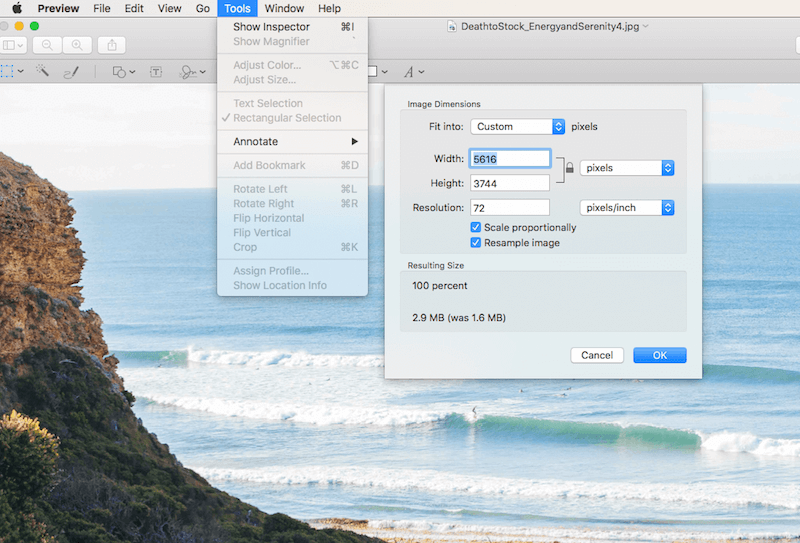
    Apple: Open your image up and size it down using your tool of choice. On a Mac you simply open the image in “Preview” and in toolbar area you will see a “Tools” option. Click on tools > adjust size and adjust the size accordingly. Again, anything over 1000px across is overdoing it and more often than not your image needs will be smaller. Once you adjust the size your image will be ready for compression.

    Adjusting-Image-Size

    PC: If you are using a PC there are a few different options, but the easiest way to size an image quickly is to follow the steps in the video below.

    Step 2: Image Compression

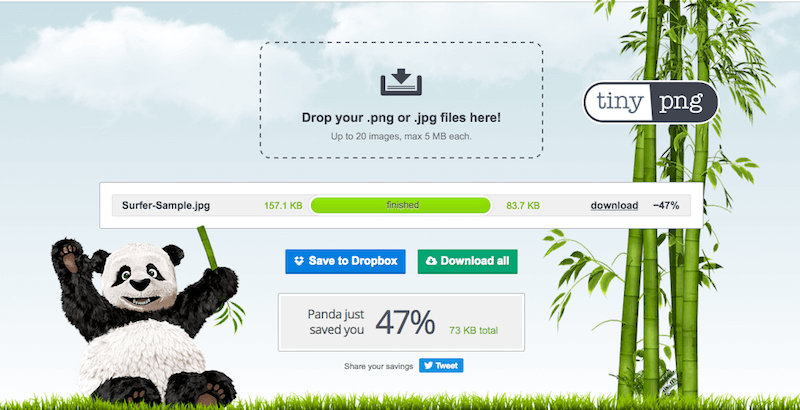
    At this point your image is now sized down and is ready for compression. Take the image or images you recently sized and head over to Tiny PNG You will immediately see where to drag and drop images. You simply drag your images into the drop area and Tiny PNG will do the rest. You will see the compression numbers and be able to see the amount of space that the compression engine is saving you.

    There is also detailed documentation about image quality and how your images remain high quality even after the compression, so feel free to view that. If you are skeptical go ahead and download the newly compressed file, open it, and compare it to the image that hasn’t been compressed. You will not see a difference. I have run a sample for you and posted the results in the screenshot below.

    Tiny-PNG-Sample

    Final Thoughts

    These days it isn’t enough to just add images to your website. Whatever type of website you are running it is very important to address the issue of sizing and compressing images for WordPress. Whether you are running an online eCommerce site, a business site with a blog, or a full online blog, making sure your images are nice and tight will insure that you are not sacrificing site speed, SEO or site resources.